
Last updated on
Oct 31, 2026
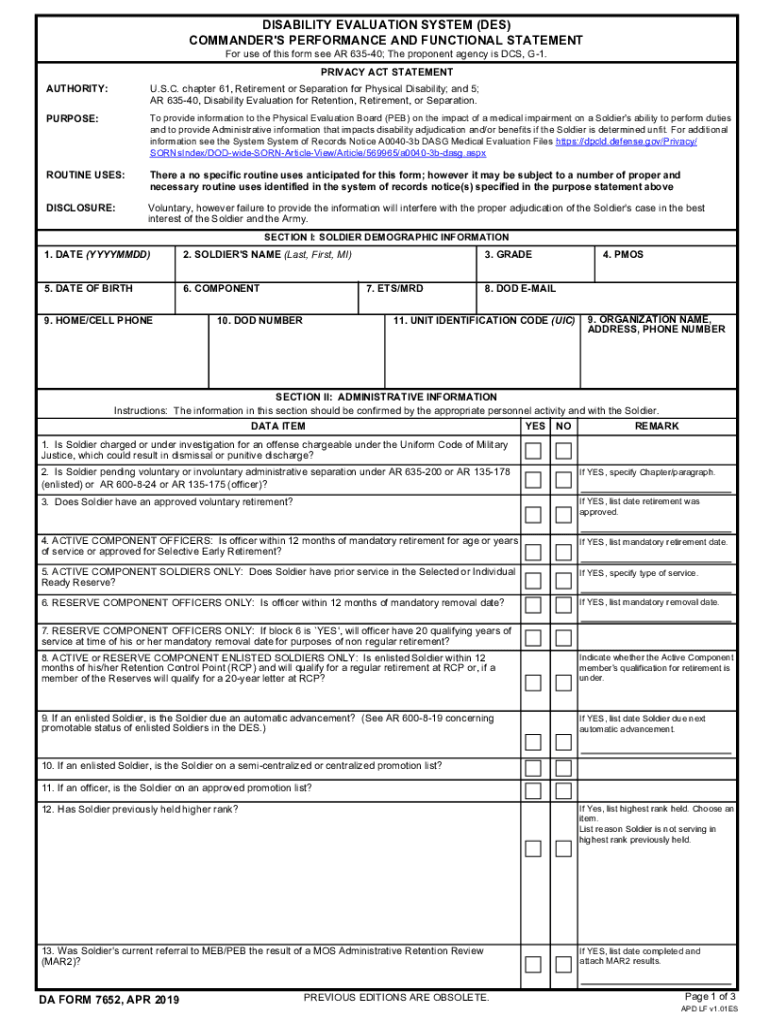
DA 7652 2019-2026 free printable template
pdfFiller is not affiliated with any government organization

Fill out
Complete the form online in a simple drag-and-drop editor.

eSign
Add your legally binding signature or send the form for signing.

Share
Share the form via a link, letting anyone fill it out from any device.

Export
Download, print, email, or move the form to your cloud storage.
Why pdfFiller is the best tool for your documents and forms


End-to-end document management
From editing and signing to collaboration and tracking, pdfFiller has everything you need to get your documents done quickly and efficiently.
Accessible from anywhere
pdfFiller is fully cloud-based. This means you can edit, sign, and share documents from anywhere using your computer, smartphone, or tablet.
Secure and compliant
pdfFiller lets you securely manage documents following global laws like ESIGN, CCPA, and GDPR. It's also HIPAA and SOC 2 compliant.
What is DA 7652
The Disability Evaluation System Commander's Performance Statement is a government form used by U.S. Army commanders to assess a Soldier's medical condition and its impact on duty performance.
pdfFiller scores top ratings on review platforms




I can sign and update any PDF file. This is easy to use
Easy friendly to use and very efficient to get the job done.
Great user-experience. The features are really nice.
helps me fill out forms faster and cleaner for all my kids school and doctors appointments
The app is easy to use, but it would be a little bit more helpful if there were lines to make sure that everything texted was completely level.
I love PDF filler! It is a special education teacher's dream! I just wish it was cheaper. I still bought it.
Who needs DA 7652?
Explore how professionals across industries use pdfFiller.

DA 7652 is needed by:
-
U.S. Army Commanders responsible for Soldier evaluations
-
Soldiers undergoing medical evaluation for disability
-
Physical Evaluation Board personnel assessing disabilities
-
Human Resources officers managing Soldier documentation
-
Legal advisors in military disability cases
-
Family members seeking information on Soldier evaluations
Comprehensive Guide to DA 7652
What is the Disability Evaluation System Commander's Performance Statement?
The Disability Evaluation System (DES) Commander's Performance Statement is a vital form within the U.S. Army that assesses how a Soldier's medical condition impacts their capabilities. This document plays a crucial role in the evaluation process, providing essential information to the Physical Evaluation Board (PEB) for accurate disability adjudication. It allows commanders to comprehensively document a Soldier's performance and functional ability, significantly influencing the outcomes of military disability claims.
Purpose and Benefits of the Disability Evaluation System Commander's Performance Statement
This form is fundamental for both service members and their commanders, as it facilitates an effective military disability assessment. Accurate documentation of a Soldier's performance has numerous benefits, including the potential for career progression and access to vital benefits. Additionally, the Commander's Performance Statement helps ensure that all relevant information is systematically reviewed, thereby aiding in fair adjudication regarding military disability claims.
Key Features of the Disability Evaluation System Commander's Performance Statement
The Disability Evaluation System Commander's Performance Statement incorporates several distinct features that are critical for its successful completion. Key components include:
-
Demographic information about the Soldier and the commander
-
Comprehensive performance evaluations
-
Commander contact details for follow-up
Users must pay attention to fillable fields, which often include checkboxes and signature requirements. The form is governed by AR 635-40, ensuring adherence to established regulations.
Who Needs the Disability Evaluation System Commander's Performance Statement?
The primary users of this form are commanders responsible for completing it during the evaluation process. It is crucial for Soldiers undergoing evaluation, particularly in circumstances like deployment or disability claims. By accurately filling out the performance statement, commanders contribute significantly to the decision-making processes regarding military disability adjudication.
How to Fill Out the Disability Evaluation System Commander's Performance Statement Online
To complete the Disability Evaluation System Commander's Performance Statement digitally, follow these steps:
-
Access the form using pdfFiller online platform.
-
Fill out the required fields, notably the Soldier's name and date.
-
Include the necessary signatures in the designated areas.
Ensure that all information is accurate, as errors in submission can lead to significant delays or rejections of the evaluation process.
Common Errors When Completing the Disability Evaluation System Commander's Performance Statement
When filling out the Commander's Performance Statement, users often encounter common pitfalls, including:
-
Omitting required fields, such as the Soldier's name or contact information
-
Failing to provide accurate performance evaluations
To avoid these issues, double-check all entries for accuracy and ensure thorough review before submission. Taking these precautions can enhance the reliability and acceptance of the form.
How to eSign the Disability Evaluation System Commander's Performance Statement
Signing the Disability Evaluation System Commander's Performance Statement can be completed digitally, which ensures a valid signature. There are notable distinctions between digital signatures and wet signatures; the former often provides enhanced verification methods. Using pdfFiller, users can eSign documents securely, maintaining compliance with military requirements.
Where to Submit the Disability Evaluation System Commander's Performance Statement
Submission of the Commander's Performance Statement can be conducted through various methods. Acceptable submission methods include:
-
Digital submission via designated platforms
-
Physical submission to the appropriate administrative body
It is important to note any associated fees, deadlines, and expected processing times relevant to the submission of this form.
Security and Privacy Considerations for the Disability Evaluation System Commander's Performance Statement
Handling sensitive information is paramount when dealing with the Commander's Performance Statement. pdfFiller complies with stringent regulations, including HIPAA and GDPR, ensuring that all data is securely managed. Features such as 256-bit encryption safeguard personal information, providing users with essential data protection in the processing of their documents.
Experience Efficient Form Management with pdfFiller
Users are encouraged to leverage pdfFiller's capabilities for the seamless completion and management of the Disability Evaluation System form. The platform allows for easy text editing, form filling, and secure document sharing. With robust security measures in place, pdfFiller ensures that sensitive documents are handled with care, making it the ideal solution for military form management.
How to fill out the DA 7652
-
1.Access pdfFiller and search for 'Disability Evaluation System Commander's Performance Statement' in the template library.
-
2.Open the form to view its various sections including Soldier's demographic details, performance evaluations, and administrative information.
-
3.Gather all necessary information prior to completing the form, such as the Soldier's name, medical history, and specific performance evaluations.
-
4.Navigate through the fields of the form using pdfFiller's interface. Click on each field to enter the relevant information. Utilize checkboxes and signature lines as required.
-
5.Fill out all mandatory fields accurately, paying special attention to the details regarding the Soldier's performance and contact information for the commander.
-
6.Review your completed form for accuracy and completeness to prevent any common mistakes that could delay processing.
-
7.Finalize the form by saving the completed document. Choose the options to download or directly submit through pdfFiller, ensuring all required fields are filled before submission.

Who is eligible to fill out the Disability Evaluation System Commander's Performance Statement?
Eligibility to fill out this form typically includes U.S. Army commanders responsible for evaluating their Soldiers' performance impacted by medical conditions.
What is the deadline for submitting the Performance Statement?
While the metadata does not specify deadlines, it is crucial to submit the Performance Statement promptly as part of the Disability Evaluation System process to avoid delays in assessment.
How should I submit the completed form?
Completed forms can be submitted through pdfFiller by following the saving and submission options provided in the interface. Ensure all fields are complete before submission.
What supporting documents are required with this form?
The supporting documents typically include the Soldier's medical records, previous performance evaluations, and any other pertinent information required by the Physical Evaluation Board.
What common mistakes should I avoid when filling out the statement?
Common mistakes include leaving mandatory fields empty, providing inaccurate Soldier information, and neglecting to get required signatures. Double-check all entries for accuracy.
How long does it take to process the Performance Statement?
Processing times may vary, but typically, submissions related to the Disability Evaluation System should be reviewed within a few weeks. Keep track of your submission status.
Is notarization required for this form?
No, notarization is not required for the Disability Evaluation System Commander's Performance Statement as per the form's metadata.
DA 7652 Form Versions
Related Content
Related Forms



Related Catalogs
Get the latest insights from our blog


If you believe that this page should be taken down, please follow our DMCA take down process
here
.
This form may include fields for payment information. Data entered in these fields is not covered by PCI DSS compliance.